Also read - 3rd party VPNs with Cloud VPN
Overview
Depending on your encryption needs, colo agreements and dedicated versus Shared requirement, GCP Interconnect offers a few options when it comes to setting up Cloud Interconnect.
5 ways to connect to Google Cloud
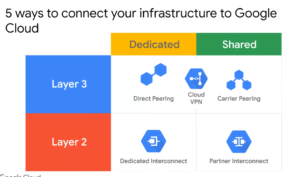
Dedicated Interconnect - 10 or 100 Gbps - Connection in colocation facility
Partner can set the capacity and encryption requirements - Connection in Service Provider facility
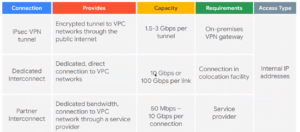
What about encryption of Interconnect traffic?
By default, this traffic is unencrypted. However, like MacSec on AWS (for Direct Connect encryption), GCP offers the following workarounds if you absolutely need to encrypt this cloud interconnect traffic:
Self Managed VPN Gateways
If you need encryption at the IP layer, you can create one or more self-managed (non-Google Cloud) VPN gateways in your Virtual Private Cloud (VPC) network and assign a private IP address to each gateway. For example, you can run a strongSwan VPN on a Compute Engine instance. You can then terminate IPsec tunnels to those VPN gateways through Cloud Interconnect from an on-premises environment.
Cloud APIs and always encrypted traffic
Depending on the service that is accessed by using Cloud Interconnect, your traffic might already be encrypted without your needing to do anything special. For example, if you are accessing one of the Google Cloud APIs reachable over Cloud Interconnect, that traffic is already encrypted with TLS in the same way as if the APIs were accessed over the public internet.
TLS for layer 7 traffic
You can also use the TLS solution for services that you create; for example, a service that you offer on a Compute Engine instance or on a Google Kubernetes Engine Pod that supports the HTTPS protocol.
Summary
Depending on your encryption needs, colo agreements and dedicated versus Shared requirement, GCP Interconnect offers a few options when it comes to setting up Cloud Interconnect.

Hello Anuj,
Based on the above matrix, my understanding is that the Dedicated Interconnect helps us to establish a tunnel between two endpoints, but the data and network are not encrypted. Could you please confirm?
Also, if encryption is needed for Dedicated Interconnect, could you please suggest a few options?
Correct. Dedicated interconnect in un-encrypted. You can impose encryption on top in several ways. This is from google’s interconnect documentation:
1. If you need encryption at the IP layer, you can create one or more self-managed (non-Google Cloud) VPN gateways in your Virtual Private Cloud (VPC) network and assign a private IP address to each gateway. For example, you can run a strongSwan VPN on a Compute Engine instance. You can then terminate IPsec tunnels to those VPN gateways through Cloud Interconnect from an on-premises environment.
2. Depending on the service that is accessed by using Cloud Interconnect, your traffic might already be encrypted without your needing to do anything special. For example, if you are accessing one of the Google Cloud APIs reachable over Cloud Interconnect, that traffic is already encrypted with TLS in the same way as if the APIs were accessed over the public internet.